Release notes · Week of 6–12 October 2026
Approvals in early access, VEP on your phone and agreements in one line
In early access, your AI employee can ask for your yes before it sends an email, changes your CRM or books a meeting. VEP now works like a familiar messenger on your phone and tablet. Promises from the conversations your AI employee follows read as one line each. It can also set one-time reminders and tell you when an expected Gmail reply arrives.
- 6 new
- 8 improved
- 4 fixes
Updates marked Early access are switched on for selected companies.
Highlights

Approve your AI employee's emails, CRM changes and meetings first
Your AI employee asks you one plain question, does exactly what you approved and tells you whether it went through.
For business owners
Read more: Approve your AI employee's emails, CRM changes and meetings first
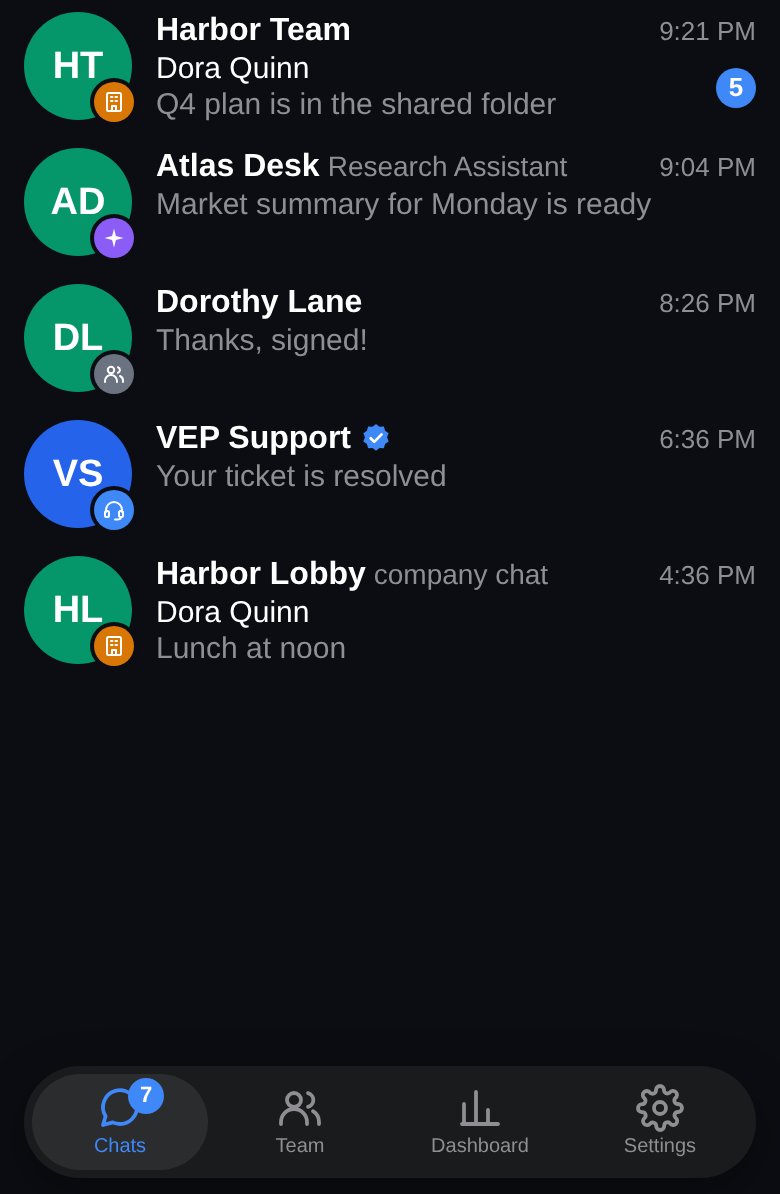
Chat with your AI employees on your phone and tablet
Phones and tablets get one chat list and a familiar message bar, laid out for touch in any orientation.
For everyone who works with an AI employee
Read more: Chat with your AI employees on your phone and tablet
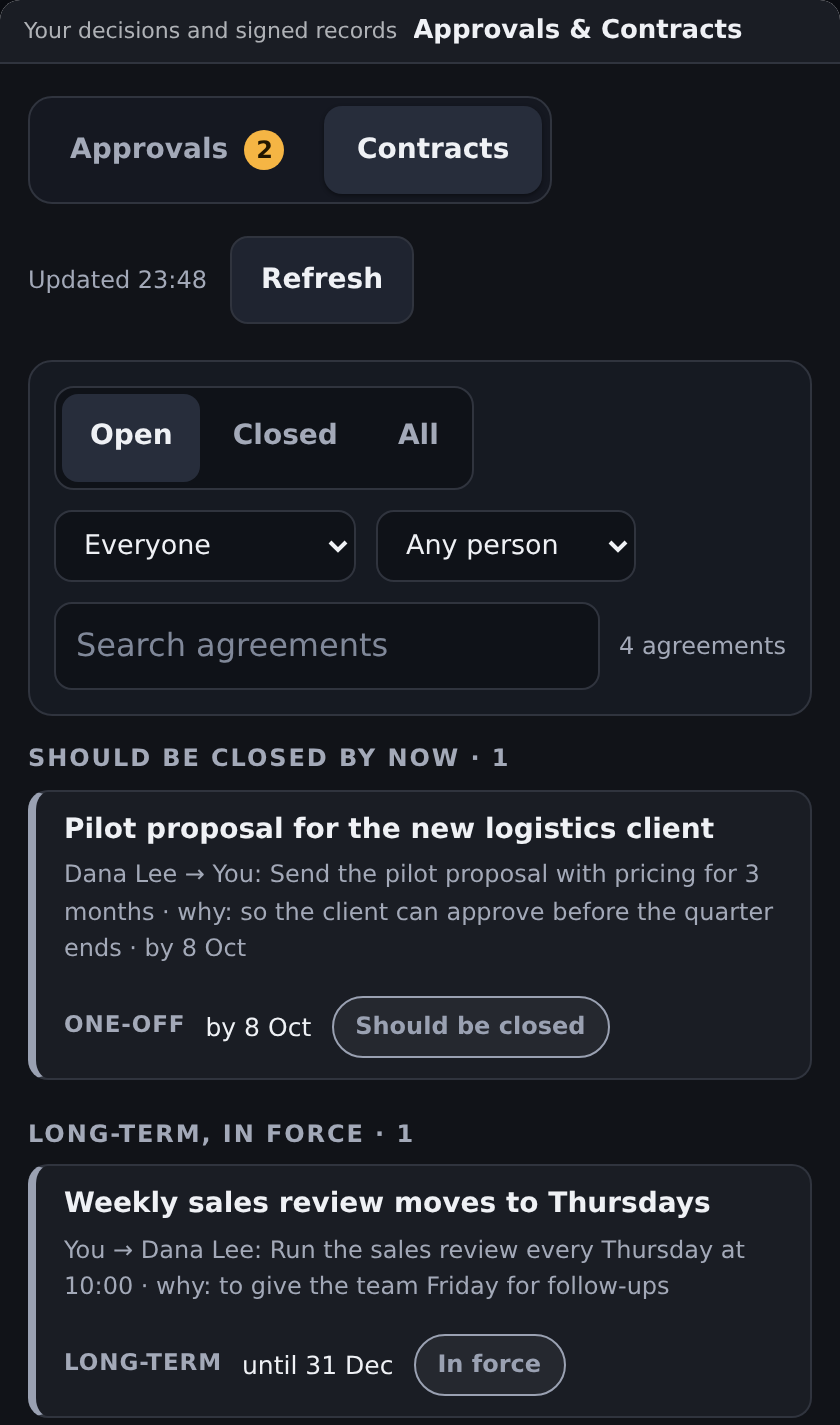
See who promised what and by when, one line each
Each promise reads as one line with who owes it, to whom and by when, grouped by what needs your attention.
For business owners and managers


New and improved
AI employees & teams
- Report a problem to VEP Support and it reaches a person
Your report gets a number, reaches an admin of your company and the VEP team, and their answer comes back to the chat where you wrote.
- When an AI employee is unavailable, the right person is told
The person who can fix the problem gets one alert, everyone else gets a short plain note, and the AI employee answers the waiting questions once it works again.
- A lead AI employee brings you only the decisions Early access
AI employees ask each other in a team chat open to the admins you choose, hand over tasks, and one lead AI employee brings you the decisions they cannot make.
Chats & mobile
- Split a chat with your AI employee into topics, one per task Early access
Each task has its own topic tab, and a message in one topic is often answered while another topic is still in progress.
- Chat with your AI employees on your phone and tablet
Phones and tablets get one chat list and a familiar message bar, laid out for touch in any orientation.
- Answers that fit your phone and your local time
Your AI employee plans with your local time, and for a message you type on a phone it aims for a shorter answer that leads with what matters.
Meetings
- Meeting notes name more speakers and cover long calls
Speakers that Meet captions name get their names, long calls get their notes, and the notes email links straight to them.
Approvals & agreements
- See who promised what and by when, one line each
Each promise reads as one line with who owes it, to whom and by when, grouped by what needs your attention.
- See what waits for your yes and what you decided, on one screen Early access
One screen lists what waits for your answer and what you decided, with a clear status for each action.
- Approve your AI employee's emails, CRM changes and meetings first Early access
Your AI employee asks you one plain question, does exactly what you approved and tells you whether it went through.
Knowledge & files
- Picture edits keep the original and show what changed
The original picture stays, each edit is a new picture you can compare with it, and older messages keep showing the version you saw.
Tasks & research
- Web research that works through the whole list
Your AI employee works through the list to the end or to the point you set, going on in a follow-up run when a list is very long, and rechecks the matches before it answers.
- One-time reminders and an alert when a reply arrives
Your AI employee sets one-time reminders and end dates, tells you within minutes when an expected Gmail reply arrives, and lists everything in your time zone.
Your own AI & hardware
- Use your own Claude or ChatGPT plan with your AI employees
You open a link on your phone or computer, sign in to Claude and paste the code into a page that names the AI employee or company you connect.
Fixes
- Archive a chat, and a new message brings it back
An archived chat moves out of your list, works as usual, and returns when a new message arrives, unless you muted it.
- Messages and photos you send from your phone arrive complete
Messages go out once the network is back, photos go with their message, and voice messages play on iPhone.
- Your chats open at the newest message
Chats open at the newest message, and in the chat with your AI employee the down arrow works on the first tap and turning the phone keeps your place.
- Answers on your own Claude or ChatGPT plan do not count as VEP usage
Only answers that VEP pays for count as VEP usage, and the usage panel shows exactly that number.